
Please note: Convert audio files Itunes must comply with the specifications listed below in order to be uploaded to the streaming/downloading platforms.
To Convert audio files to Itunes to the correct format, follow the instructions: 16-bit stereo WAV (sample size), 44.1 kHz (sample rate), 1411 kbps (rate) in iTunes before distributing on Wiseband :
A. Open the iTunes (Music) application on your computer.
B. Search for the track in the library and click (once) on the right title)
C. Go to “Preferences” (top left)
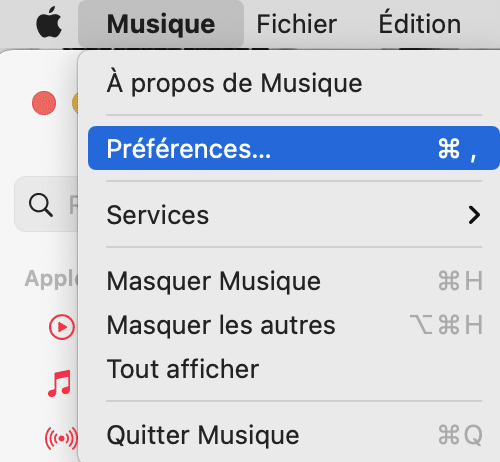
D. After clicking on “Preferences“, make sure you are in the General tab. Then go to “Import Settings“.
E. Then “import to format“, choosing “WAV encoder”. Then “Customize the parameters“. A new window will open.
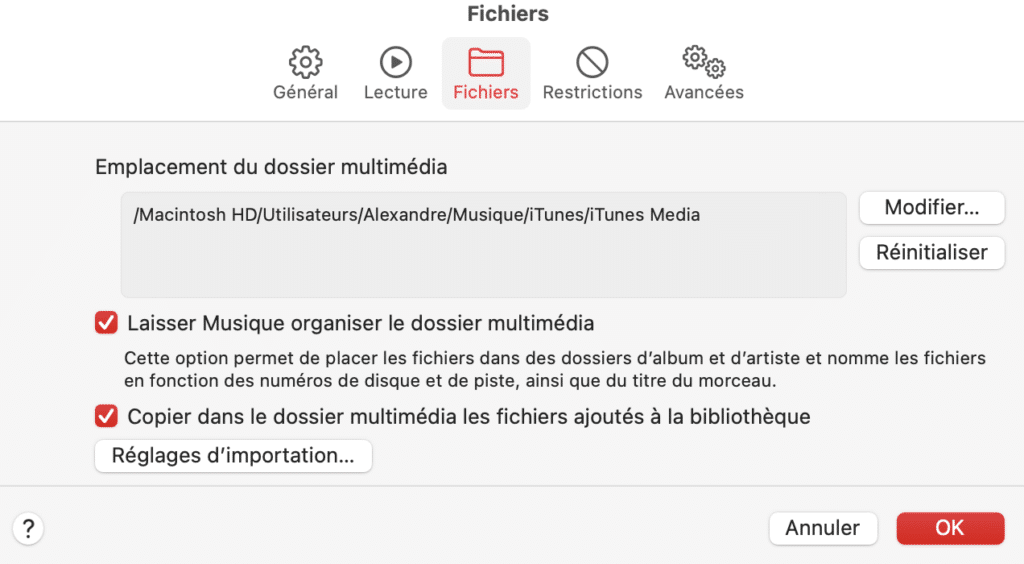
F. In the “Import Settings” window, make sure “Sample Rate” is 44.1 kHz and “Sample Size” is 16 bits. Make sure “Channels” is Stereo. Then click OK to return to iTunes (Music).
G. When the conversion is complete, the songs that are “highlighted” are the older versions.
Now it’s perfect, you can upload your files safely to Wiseband.
Read next: Digital Music Distribution: The Definitive Guide for Artists (Wiseband) · How to Upload Music to Spotify: Complete Guide for Successful Digital Distribution · Best practice Music Marketing and Music Promotion · distribute your music with Wiseband